
Atira Employee Request Form Guide
Link for the Employee Request Form: Atira Employee Request Form
Link for Video Training: Employee Request Form Video Training Guide
Why should you complete the Employee Request Form?
The Atira Employee Request Form is an essential tool that helps ensure employee-related changes are handled smoothly, accurately, and securely across the organization. Whether an employee is joining, leaving, taking a leave of absence, or changing positions, this form provides the necessary information to support timely coordination between departments.
Who can use this form?
This form is available to Managers and Directors only. Restricting access helps maintain proper oversight and ensures all requests are reviewed and authorized appropriately before processing.
When should it be submitted?
Please submit the form at least 3 business days in advance of the requested change whenever possible. This gives IT, PnC, and Administrative teams enough time to prepare accounts, equipment, system access, and any additional resources required.
Form Access & Main Options
Access the form here:
Atira Employee Request Form
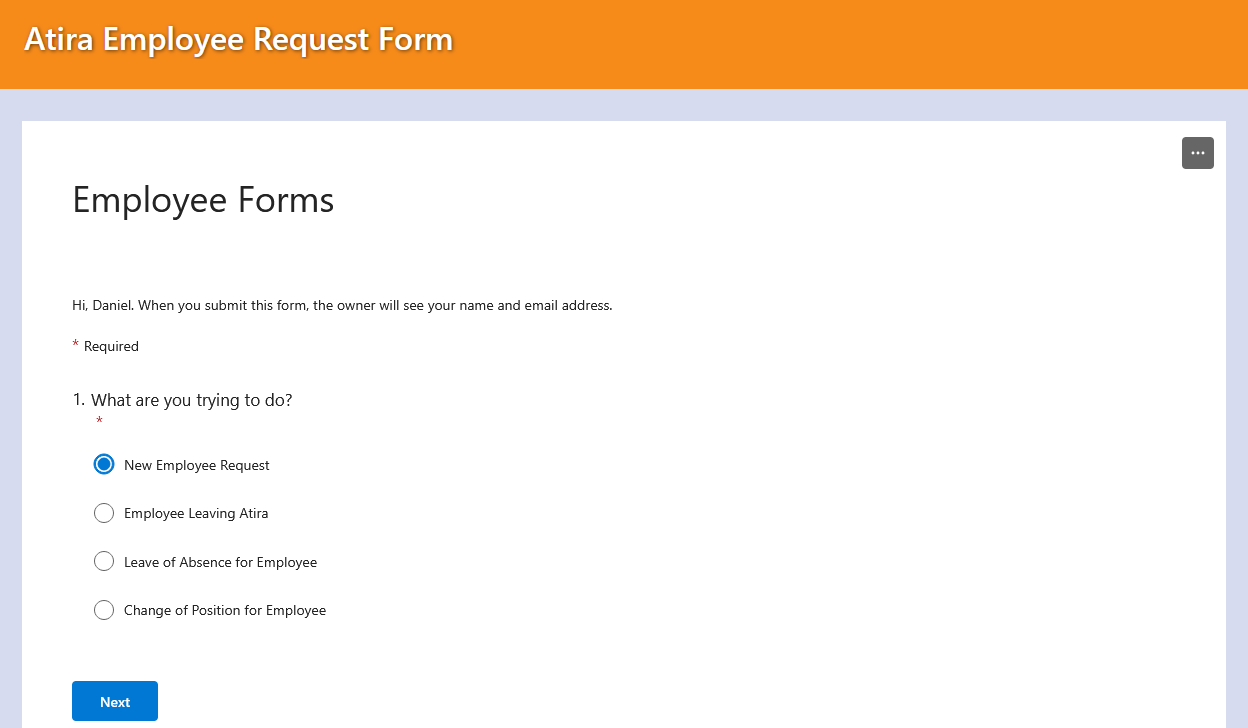
When accessing the form, users will be asked: "What are you trying to do?" You must select one of the four available request types.
1. New Employee Request Form
Use this form when a new employee joins your team so IT and Administrative teams can prepare all required equipment, accounts, and access before the employee starts.
Important Information & Reminders
- Ensure the employee start date is accurate.
- Include all required network drives and email groups.
- Select all IT equipment required for the employee.
- Specify any software or system accounts required such as Yardi or 1Password.
- Provide any onboarding notes or special setup requests.
Form Fields
Field | Description / Options |
Requester | Enter your answer |
New employee's full name | Enter your answer |
Company | AWRS, APMI, ADS, AWAS, ECLC |
Employee Department | People & Culture, Accounting, Operations, IT, Property Management, Other |
Employee Position | Enter your answer |
Employee Location | Enter your answer |
Employee Start Date | Please input date (M/d/yyyy) |
Network Drive Access | Specify required network drives |
Email Groups | Specify required email groups |
IT Equipment Required | Laptop, Desktop, Monitor, Cellphone, Headset, Keyboard, Mouse |
Additional Accounts Required | Yardi, 1Password, Ooma, Telus Business Connect, Other |
Other Notes or Requests | Additional onboarding details |
2. Leavers Form
Use this form immediately when an employee leaves the organization to ensure access is disabled and company equipment is recovered.
Important Information & Reminders
- Ensure the last day of work is accurate.
- Provide the correct email forwarding address if emails should be redirected.
- If an automatic reply is required, include the exact message to be configured.
- Select all IT equipment that must be returned.
- Provide any offboarding instructions or special requests.
Form Fields
Field | Description / Options |
Requester | Enter your answer |
Leaver's Name | Enter your answer |
Job Title | Enter your answer |
Company | AWRS, APMI, ADS, AWAS, ECLC |
Last Day of Work | Please input date (M/d/yyyy) |
Email Forwarding Address | Specify where emails should be redirected |
IT Equipment to be Returned | Laptop, Monitor, Headset, Cellphone, Other |
Auto Reply | Provide auto-reply message if required |
Other Notes or Requests | Additional offboarding details |
3. Leave of Absence Form
Use this form to manage temporary leaves and coordinate communication coverage and temporary access changes.
Important Information & Reminders
- Provide accurate leave and return dates.
- Specify where emails should be redirected during the leave period.
- If an automatic reply is required, provide the exact message.
- Include any notes related to coverage, access, or equipment.
Form Fields
Field | Description / Options |
Requester | Enter your answer |
Employee on Leave | Enter your answer |
Job Title | Enter your answer |
Employee Department | People & Culture, Accounting, Operations, IT, Property Management, Other |
Company | AWRS, APMI, ADS, AWAS, ECLC |
Leave Date | Please input date (M/d/yyyy) |
Return Date | Please input date (M/d/yyyy) |
Email Redirection Address | Specify where emails should be redirected |
Auto Reply | Provide auto-reply message if required |
Other Notes or Requests | Additional leave-related details |
4. Change of Position Form
Use this form when an employee changes roles, departments, or companies so their permissions, equipment, and access can be updated.
Important Information & Reminders
- Include both the current and new employee details.
- Specify any equipment that should be returned.
- Select any additional hardware required for the employee’s new role.
- Include all required network drives and email groups for the new position.
- Provide any transition notes or special access requirements.
Form Fields
Field | Description / Options |
Requester | Enter your answer |
Employee's Full Name | Enter your answer |
Current Email Address | Enter your answer |
Current Company | AWRS, APMI, ADS, AWAS, ECLC |
Current Department | People & Culture, Accounting, Operations, IT, Property Management, Other |
Current Job Title | Enter your answer |
IT Equipment to be Returned | Laptop, Monitor, Headset, Cellphone, Other |
Change-over Date | Please input date (M/d/yyyy) |
New Company | AWRS, APMI, ADS, AWAS, ECLC |
New Department | People & Culture, Accounting, Operations, IT, Property Management, Other |
New Job Title | Enter your answer |
Network Drive Access | Specify required network drives |
Email Groups | Specify required email groups |
IT Equipment Required | Laptop, Desktop, Monitor, Cellphone, Headset, Keyboard, Mouse, Other |
Other Notes or Requests | Additional role transition details |
Why It Matters
- Keeps Everyone Informed: Alerts IT, PnC, and Administrative teams about employee changes.
- Prevents Oversights: Ensures account setup, permissions, and access changes are completed properly.
- Speeds Up the Process: Complete information allows workflows to begin immediately.
- Provides Accountability: Every request is documented and traceable.
- Ensures Consistency and Accuracy: Standardizes the employee request process.